Choosing a charger is not only a question of output power. Its location affects cable reach, desk space, and how easily you can unplug a device. A wall-mount charger can keep a crowded work surface clear and place power near a bedside table. A desktop charger may offer several ports in one accessible hub, useful when phones, tablets, and accessories share a desk. Small details matter.
How to choose between wall-mount and desktop source chargers depends on your setup, daily habits, and the devices you need to charge. Check the charger’s rated output, port arrangement, cable length, and ventilation guidance. Then picture the actual spot: Is the outlet behind a cabinet? Will a thick adapter block a neighboring socket? Does the desktop unit’s cable reach comfortably? These practical checks can matter more than a sleek product photo. Neither format is automatically better.
An expert quotation should be verified before publication, and no source article or expert citation was supplied for this draft. The following is an editorially proposed line, not a verified quotation, for a named charging-systems specialist to review: “Choose the form factor that keeps power close, cables manageable, and everyday use uncomplicated.” A real specialist’s name and approval should replace this note before publishing. That extra step is worth taking. Even a well-designed charger can be inconvenient in the wrong place.
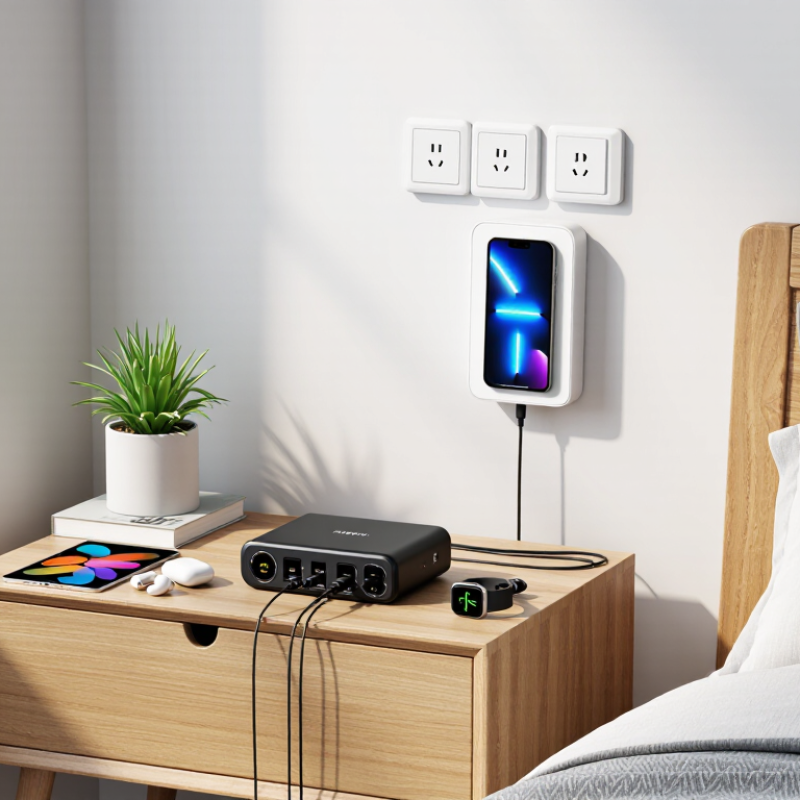
A wall-mount charger is a charging unit fixed to a wall or another stable vertical surface. Its housing usually keeps the power electronics in one compact enclosure, with a cable or outlet positioned nearby. A desktop charger sits on a desk, shelf, or counter. It may have several ports and a separate power cord, making it easy to move between work areas. The distinction sounds simple, but cable layouts can blur it.
Wall-mounted designs keep equipment off the desk and can make cables easier to route along a wall. Installation needs a suitable surface, clear access to the charging connector, and enough space for airflow. A desktop model generally needs only a level surface and a nearby power outlet. It stays put. Either design should be matched to the device’s charging requirements, including supported voltage, current, and connector type.
In practice, placement often matters as much as the charger’s shape. A unit beside a workbench may benefit from a fixed mount, while a shared desk may suit a portable charger with multiple ports. Check the manufacturer’s installation instructions and keep ventilation openings unobstructed. One small oversight: a tidy cable path can still leave too little room to unplug a device comfortably.
Wall-mounted chargers suit fixed parking bays with a nearby electrical supply. A licensed electrician can assess circuit capacity, cable routing, and mounting height before installation. The U.S. Department of Energy’s Alternative Fuels Data Center notes that Level 2 equipment typically uses 208- or 240-volt power and can add about 10–20 miles of driving range per charging hour. That load may require a dedicated circuit. Older panels can complicate the job.
A desktop or portable unit needs a stable, dry surface and enough clearance for its cable and ventilation. It can be easier to relocate, but the outlet still needs to support the charger’s electrical demand. Keep cables away from walkways, doors, and standing water. Small detail, big difference. A loose cable across a garage floor is easy to overlook until someone trips.
Placement should follow the daily routine, not just the nearest outlet. For a wall unit, measure from the parking position to the charge port, then leave slack without creating a loop on the floor. For desktop placement, check that the unit cannot be knocked off a bench or exposed to dust and moisture. The U.S. Department of Energy’s AFDC guidance describes Level 2 charging as faster than standard household Level 1 charging, but real charging speed depends on the vehicle and electrical supply. That part is often underestimated.
Sources: U.S. DOE Alternative Fuels Data Center, “Developing Infrastructure to Charge Electric Vehicles.”
Charging speed depends less on placement than on the charger’s output, your device’s charging limit, and the cable. A wall-mounted charger keeps power within reach beside a bed or desk and helps reduce cable clutter. A desktop charger is easier to move and may provide several ports, but those ports can share its total power. Small detail, big difference.
Check the charger’s rated wattage and supported charging standard before choosing. A 65-watt charger will not force a phone to draw 65 watts; the phone takes only the power it supports. A weak or damaged cable can also reduce charging speed. For multiple devices, check whether the stated output applies to one port or is divided across all ports. Compatibility can be less obvious than the label suggests, so verify the device’s specifications. Wall placement is convenient, but a fixed outlet may not suit every room.
Tips: Match the charger’s output to your device, then check the cable and port ratings. Test your usual setup with the screen off; charging results can vary with heat, battery level, and background use.
| Comparison | Wall-Mount Charger | Desktop Charger |
|---|---|---|
| Typical setup | Plugs directly into a wall outlet; usually sits behind or beside the device being charged. | Sits on a desk or other surface and typically connects to a wall outlet with a power cord. |
| Common total output range | Many consumer models provide roughly 20–140 W total, depending on size and port configuration. | Many multiport models provide roughly 65–200 W total, though available output varies by model. |
| Charging speed | Can charge quickly when its output matches the device’s supported charging standard and power requirements. | Can charge just as quickly as a wall charger with the same supported output; the desktop form alone does not increase speed. |
| Multiple devices | Multiport models can charge several devices, but available power may be shared or reassigned when devices are connected or disconnected. | Often offers several ports and higher combined output, making it convenient for charging a laptop, phone, and accessories together. Power may still be shared between ports. |
| Portability and space | Usually compact and easy to pack; larger models can block neighboring outlets. | Usually less convenient to carry and takes up desk space, but its cord can make outlet access easier. |
| Compatibility checks | Check the port type, supported protocol (such as USB Power Delivery), and the charger’s output profiles against the device’s requirements. | Check the same specifications, plus each port’s individual output and how power is allocated when multiple devices are connected. |
| Cable considerations | Use a cable rated for the required current and power; some higher-power USB-C setups require an electronically marked cable. | Cable requirements are the same. A higher-wattage charger cannot make a device charge beyond its supported limit. |
| Best suited for | Travel, bedside use, and a compact setup where one or a few devices need charging. | A fixed workspace where several devices need charging from one convenient location. |
Note: These ranges are illustrative, not guarantees. Actual charging speed depends on the device, charger port, charging protocol, cable, and power sharing. USB-C Power Delivery specifications support power levels up to 240 W with compatible equipment, but not every charger or device supports that level.
Why Choose Wall Mount vs Desktop Chargers?
Space, Safety, and Everyday Usability
Wall-mounted chargers free up a desk, counter, or bedside table. A cable can hang close to a device instead of crossing a work surface. In a small kitchen, that matters when cups and keys already compete for room. Installation still requires a suitable outlet and a clear cable path. Not every wall is convenient.
Desktop chargers are easier to move. They can serve several devices from one central spot, and setup usually takes little effort. But the unit and its cables take up valuable space. Loose leads may snag on a sleeve or slide behind furniture. A stable base helps, though it cannot eliminate clutter. Small detail, big difference.
Safety depends on placement and daily habits, not just charger style. Keep chargers uncovered, away from moisture, and clear of walkways. A wall mount can reduce tangles, but a poorly placed one may leave a cord dangling at shoulder height. Check outlets and cables periodically. Some warmth during use can be normal; unusual heat, damage, or a burning smell means unplugging the charger. I still find that the tidier option can feel awkward when a device is used far from the outlet. Consider reach, foot traffic, and what your hands actually do each day.
Desk surface footprint in an example setup: The wall-mounted charger uses no desk surface, while the desktop charger occupies an illustrative 80 cm² (10 × 8 cm). Actual footprints vary by charger model and placement. Wall mounting can free desk space; either setup should keep cables tidy and outlets accessible.
Choosing between wall-mount and desktop chargers starts with the space around your outlet. A wall-mounted unit keeps the floor and desk clearer, which helps in narrow rooms or shared work areas. It can also keep cables from trailing across a tabletop. Check the outlet position and cable length first; a charger mounted behind furniture may be awkward to reach. Small detail. Big difference.
Desktop chargers suit people who move devices around or need several ports within arm’s reach. Place one beside a laptop, and phones, earbuds, or other devices can charge without reaching toward a wall. A heavier unit may stay put, but a crowded desk can quickly lose usable space. Consider how many devices you charge at once, how much room their plugs need, and whether the charger blocks nearby sockets.
Heat, ventilation, and daily handling matter for either type. Keep chargers uncovered and follow the maker’s guidance on compatible devices and power limits. A wall-mounted charger may be tidier, but its position is less flexible after installation. A desktop model is easier to move, though its cables can collect dust and tangle. There is no perfect arrangement; cable reach is easy to underestimate, and a quick sketch of your setup can reveal inconvenient outlet locations before you buy.
A wall-mounted charger attaches to a stable vertical surface. A desktop charger rests on a desk, shelf, or counter. Cable layouts can blur the difference.
It can free up a crowded desk or narrow counter. A cable routed along the wall may stay away from cups and keys. Check that the outlet is easy to reach.
It is easy to move between work areas and usually needs little setup. Multiple ports can keep a phone and earbuds within arm’s reach. It still takes up desk space.
Choose a suitable surface and leave room around ventilation openings. Check the cable’s reach and make sure the connector is comfortable to unplug. A tidy route can still be awkward.
Keep cables away from walkways and places where sleeves might catch them. A wall mount can help, but a dangling cord may create a different problem. Look at the whole route.
Yes. Keep either type uncovered and follow its installation guidance. Avoid placing it under papers or against soft items. A little warmth can be normal.
Check the number of ports, supported power, voltage, current, and connector types. Allow room for bulky plugs. A crowded outlet can be easy to overlook.
Unplug it if you notice unusual heat, visible damage, or a burning smell. Check cables and outlets periodically. Don’t ignore a strange smell.
Wall-mount and desktop chargers serve the same basic purpose but differ in design and placement. Wall-mount models attach to a fixed surface and typically require a suitable outlet and secure installation. Desktop chargers sit on a desk or other flat surface, making them easy to move and reposition. Both types can support different charging speeds and power levels, so it is important to check that a charger is compatible with the devices and cables you plan to use.
How to choose between wall-mount and desktop source chargers depends on your space, routine, and installation preferences. A wall-mounted option can keep a work area clear and provide a consistent charging spot, while a desktop model offers flexibility and convenient access to multiple ports. Consider outlet locations, available surface space, cable reach, stability, and everyday safety. Comparing these factors will help you select a charger that fits your setup and charging needs.
Caiku Electronic